Look at your desk right now. What do you see?
If your answer is a heap of cords, sticky notes stuck to other sticky notes, a monitor covered with open windows, and a keyboard buried under three coffee mugs — welcome to the club.
The vast majority of people don’t even realize that really every day their physical and digital setup is doing them more harm than good. A disorganized workspace is sending your brain a constant message: There’s too much here. That signal steals your attention, increases your stress levels, and makes easy tasks feel harder than they need to be.
And that’s exactly where setup minimalism steps in.
Setup minimalism is not about having the least stuff possible. It’s about only keeping what you really need — and getting rid of everything that competes for your attention without deserving it.
These five setup minimalism hacks are powerful, easy to implement in practice, and designed to be added to your routine without a radical overhaul. Within a matter of days you’ll begin to feel the difference.
Why Your Setup Is Stealthily Sucking Up Your Energy
Before we dive into the hacks, it’s worth spending a moment to understand what a cluttered setup does to you, specifically.
Researchers at Princeton University found that physical clutter fights for your attention even when you are not attending to it directly. Your brain tracks every additional object, every tab you leave open, and every snarl of cables as an incomplete task. Over the course of a day, those background signals build up into something called decision fatigue — the mental exhaustion caused by processing too many inputs.
The result? You feel drained by noon. You make poorer decisions later in the day. You lose your power to concentrate deeply on the things that matter.
Here’s an idea of what having a non-minimalist setup actually costs you in the course of day-to-day life:
2.5 hrs
lost from workspace distraction per day
40%
decline in productivity from disorganized environment
23 min
to recapture deep focus after distraction
77%
of people feel more stressed in cluttered spaces
Now the good news is that all of these problems can be solved. You don’t even need a Pinterest-perfect desk or a $3,000 monitor arm setup to do it. You just need the right habits every day.
Hack #1
The One-Surface Rule — Desk as a Tool, Not a Shelf
Walk into the office of any hyper-productive person in the world and you will immediately notice one thing — their desk is practically empty. That’s not an accident. That’s a system.
The one-surface rule is simple: your desk surface only exists for whatever task you need to accomplish in this moment. Everything else has a home elsewhere — a drawer, a shelf, its own tray — just not your main work surface.
What Should Actually Be on Your Desk
Most people don’t need more than five things on their desk at one time:
- Their computer or laptop
- A single notepad or notebook
- One pen (just one)
- The physical object required for whatever needs doing
- A water bottle or drink
That’s it. Books you aren’t reading at this moment? Off the desk. Cables that aren’t plugged in? Coiled and stored. Old mail, receipts, packaging? Gone.
The Daily 90-Second Reset
The single-surface rule is only effective if you adhere to it each day. Here’s the micro-habit that makes it stick: before finishing up your workday, take 90 seconds to clear your desk back to baseline.
Everything goes back to its proper place. Nothing is sitting there “for later.” You end your workday on a clean surface, and you begin the next day without friction.
The other reason this habit is particularly strong is that it generates a psychological trigger. A decluttered desk at the beginning of a session tells your brain: this is an area for concentrated work. A disheveled one sends the opposite message.
Pro tip: Snap a picture of what your perfect clean desk looks like now. Use it as your wallpaper on your phone. Every evening, make it your reset target.
Hack #2
The Two-Monitor Myth — Why Less Screen Equals More Focus
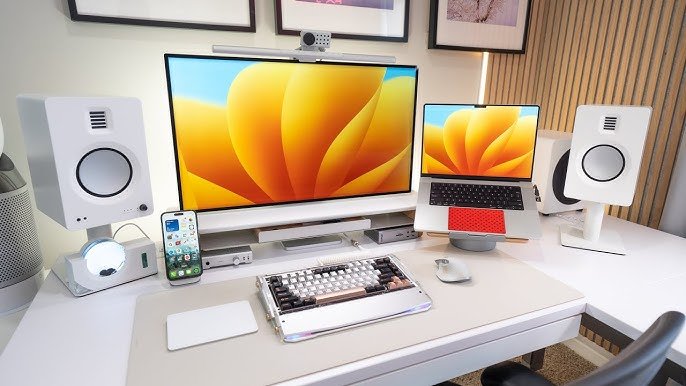
Here’s a counterintuitive truth about setup minimalism that tends to surprise many people: more screens don’t equal more productivity.
The evidence on dual monitors is truly mixed. Though for certain tasks — reference-heavy work or programming with documentation open side by side, for example — a second screen makes sense, most knowledge workers spend the bulk of their time using the second monitor as a distraction machine. Email is open on one screen. Social feeds scroll over the other. Distractions start before work even happens.
It’s not that removing a monitor is exactly the hack here. It’s about practicing designated screen areas.
The Intentional Screen Zone System
Rather than allowing screens to fill with whatever happens to be open, assign each screen a clear purpose — and stick to it every day:
| Screen / Zone | Allowed Content | Banned Content |
|---|---|---|
| Primary screen | Active work only — the document, code, or project you’re currently working on | Email, chat, social media, news |
| Secondary screen (if used) | Reference material directly related to your task | Anything passive — videos, feeds, and notifications |
| Phone screen | Turned face-down or in another room during deep work | Everything when focus blocks are activated |
The Morning Screen Purge
Each morning, before you get to work, take two minutes clearing every window, tab, and app that was left open from the night before. Start your day with an entirely clean screen — a desktop or one browser window.
This helps prevent the accumulation of “open task” residue and lets you reset each day. Every open window is an incomplete signal. Getting rid of them removes those signals before they can compete with your morning focus.
Pro tip: Go full screen with your main work application. Distraction is then far more difficult when you cannot see anything else.
Hack #3
The Cable Chaos Fix — One Hour of Setup in Exchange for Hours of Frustration

Cables are not often mentioned in productivity articles. But step into any cluttered workspace and you notice it right away — a mound of wires behind the monitor, charging cables over the desk, and headphone cords wrapping around everything else.
Cable chaos is visual noise. It’s not just unsightly — it sends your brain a signal of disorder every single time you sit down to begin working. And practically, it turns simple tasks (plugging in a laptop, locating your headphone jack) into longer annoyances than they need to be.
The one-time investment of setup minimalism translates well to cables, and pays dividends daily.
The Core Cable Minimalism Framework
Here’s an easy step-by-step guide to taming your cables once — and keeping them that way with a daily two-minute check:
| Cable Type | Minimalist Solution | Daily Habit |
|---|---|---|
| Power cables | Route behind desk using adhesive cable clips | Keep off the desk surface at all times |
| Charging cables | One designated charging spot (drawer or charging pad) | Return to that spot after each use |
| Headphone cables | Hook or dedicated holder on side of desk | Always hung up when not in use |
| Unused cables | Labeled bag inside appropriate drawer or closet | Remove from the desk immediately after you’re done |
| Loose adapters/dongles | Small tray or pouch in top drawer | Return after each session |
Going Wireless Where It Counts
A big setup minimalism hack you can work into your space is to wirelessly use those devices that come in contact with you most often. A wireless keyboard and mouse immediately eliminate two of the most common desk cables. A Bluetooth headset removes the headphone wire. A wireless charging pad on your desk means no more dangling phone cables.
You don’t have to do this all in one go. Choose one wireless upgrade per month. Your desk cable count will plummet within months. For inspiration on building a truly clean, wire-free workspace, Minimal Workspaces is a fantastic resource packed with practical setup ideas and gear guides.
Hack #4
The Digital Desktop Reset — What Your Computer Screen Says About Your Mind
Your computer desktop reflects your mental state. The desktops of most people tell a story of chaos, with icons strewn everywhere, screenshots taken six months ago, and documents with names like “untitled_43.pdf” — folders piled on top of one another seemingly at random.
A messy digital desktop doesn’t just slow down visual rendering on your screen; it turns searching for a file into a guessing game and — much like desk grime — generates an imperceptible but ever-present hum in your thinking.
The daily digital desktop reset is one of the most underrated habits you can develop for setup minimalism.
The Zero-Desktop Philosophy
The aim of the zero-desktop philosophy boils down to simple elegance: your desktop should be empty except for your wallpaper.
Not one icon. Not a single folder. Just your background image — ideally something clean, minimal, and calming.
Here’s where everything goes instead:
- Active files are kept in one “Working” folder in your Documents directory
- Downloads get cleared on a daily basis (moved, filed, or deleted)
- App shortcuts live in your taskbar or dock — not scattered across your desktop
- Screenshots are automatically saved to a dedicated folder rather than dumped on the desktop
The 3-Minute End-of-Day Digital Wipe
Before closing your computer every night, conduct a 3-minute digital desktop wipe:
- Get everything hanging around on the desktop out of there
- Empty the trash/recycle bin
- Close all open windows
- Set your browser to start with a blank tab (not your email or news feed) on next launch
Your computer will greet you with a fresh start tomorrow morning. That’s the setup minimalism effect on autopilot.
Pro tip: Choose a minimal, nature-based wallpaper — something like a misty mountain or plain linen texture. Research shows that natural imagery reduces cortisol levels and puts you in a relaxed mood for focused work.
Hack #5
The Everything-Has-a-Home Rule — The System That Makes Minimalism Stick
The real reason most people’s workspaces go back to being cluttered within days of a cleaning? They don’t have a system for where things belong. They organize by moving things from one place to another. Nothing really has an eternal, exact place to rest.
The everything-has-a-home rule is the core of sustainable setup minimalism. It means that every single object in your workspace — every pen, cable, notebook, sticky note, charger, and book — has one place it goes to live when not in use.
If something doesn’t have a home, you have two options: give it one — or dispose of it altogether.
How to Assign Homes Without Getting Too Caught Up
You don’t need a label maker and color-coded bins to make this work. Start with three zones:
| Zone | What Goes Here | Distance from You |
|---|---|---|
| Zone 1 — Arm’s reach | Things you use every single day: keyboard, mouse, notebook, pen | On or right next to your desk |
| Zone 2 — A step away | Things you use a few times per week: printer, reference books, extra supplies | Shelf or cabinet nearby |
| Zone 3 — Out of sight | Things you use rarely: archived documents, spare equipment, packaging | Closed storage, another room |
The Daily Return Ritual
Once all homes are assigned, the daily practice is simple: put everything back in its home before you leave your workspace.
This is the most important step in setup minimalism. It’s not about a one-hour reorg. It’s about taking 90 seconds to put things where they should go. Consistently. Every single day.
Over time, returning things home becomes absolutely second nature — like locking the front door when you leave your house. You won’t even think about it. Your workspace will simply stay clean.
What Happens When You Stack All 5 Hacks Together
All of these setup minimalism hacks offer value alone. But when you stack them together into a daily routine, their real power is revealed.
Here’s an example of a full daily setup minimalism routine:
| Time | Setup Minimalism Action | Time Required |
|---|---|---|
| Before work begins | Morning screen purge — close all old windows and open a clean workspace | 2 min |
| During work | One-surface rule active — nothing on desk that isn’t needed right now | Ongoing awareness |
| After each task | Return any objects used to their Zone 1/2/3 home | 30 sec |
| End of workday | 90-second desk reset + 3-minute digital desktop wipe | 4–5 min |
| Weekly | Cable check + one wireless upgrade review | 5 min |
Total time per day is less than 10 minutes. The payoff for that 10 minutes is a workspace that actively aids your focus rather than struggles against it.
The Minimalism Mindset — Why “Less” Is a Daily Practice, Not a One-Time Event
Setup minimalism hacks don’t last long-term unless you change the way you think about your workspace.
Most people experience their environment as a passive setting — just some stuff floating around them while they work. Minimalists see their environment as a dynamic tool — something that can either help them perform or inhibit them.
That shift changes everything. When your workspace is an instrument, you care for it. You tune it. You take out what is blunting its edge.
The “Would I Replace This?” Test
Quickly scan your workspace each month and ask one question of each item: if this broke or went missing tomorrow, would I even care to replace it?
If the answer is no — it doesn’t belong in your workspace. It’s consuming space, visual attention, and mental processing power without adding any value whatsoever.
This test is particularly effective for digital setups. Apps you wouldn’t reinstall if your phone reset. Software that you haven’t launched in three months. Browser extensions you added and forgot about. Everything earns its place — or it’s out.
Building Minimalism Into Your Identity
Long-term minimalists with very clean setups don’t do it because of willpower. They do it because they really enjoy the feeling of a tidy, uncluttered workspace. It becomes a part of their self-identity.
It all begins with stating it plainly: I maintain an orderly workspace for the sake of better work. Say it out loud. Then act, every day, with the five hacks in this article.
Common Setup Minimalism Mistakes That Reverse All Your Progress
Even in good faith, a handful of common errors can silently undo everything you’ve worked for.
- Going too minimal too fast. Pulling everything out at once is satisfying for a day. Then you can’t find anything and frustration sets in. Add slowly — one surface, one zone, one habit at a time.
- Minimalism without a system. Clearing your desk by putting things in random drawers isn’t minimalism — that’s hidden clutter. The everything-has-a-home rule is non-negotiable.
- Ignoring the digital side. A beautiful physical desk with 200 browser tabs open and a chaotic desktop is only half the battle. Physical minimalism and digital minimalism go hand in hand.
- Purchasing “minimalist” products to fix a clutter issue. A shiny new desktop organizer is still a thing. Less stuff trumps better-organized stuff most of the time.
- Skipping the daily reset. Undoubtedly the one biggest mistake. One skipped reset becomes two. Two becomes a week. A week becomes the old chaos. The 90-second reset is the keystone habit that holds it all together.
FAQs — Setup Minimalism Hacks Daily
Q: Do I need to completely redesign my workspace in order to try setup minimalism?
Not at all. Setup minimalism is subtraction, not renovation. You can start with a single surface, one screen zone, or just one cable fix. Small daily changes add up to a dramatically cleaner and more functional workspace over weeks.
Q: How is setup minimalism different from simply tidying up?
Tidiness is reactive — you clean when mess seems to be happening. Setup minimalism is preemptive — you arrange your environment to ensure that mess has nowhere to build up. These daily habits prevent clutter from forming in the first place, rather than responding to it after the fact.
Q: Do setup minimalism hacks work for both home offices and regular ones?
Absolutely. The principles — one surface, intentional screen zones, cable management, zero desktop, everything-has-a-home — work in any workspace regardless of location. In a shared office setup, you may not have as much power over your surroundings, but you always have control over your immediate desk space.
Q: What’s the fastest single hack to try today?
The 90-second desk reset at the close of your workday. It takes less than two minutes, costs nothing, and instantly alters how you feel when you sit down to work the next morning. It’s the fastest way to get into the daily setup minimalism habit.
Q: Does setup minimalism actually make you more productive, or is it just for the aesthetics?
It actually does enhance productivity — in a roundabout way. A cleaner setup lowers cognitive load (the mental effort your brain expends when processing what’s going on around you), leaving more brain power available for actual work. The aesthetics are a byproduct, not the aim. The point is minimizing friction in your ability to focus.
Q: How can I keep my workspace from getting cluttered again now that it’s cleaned?
The everything-has-a-home rule (Hack #5) combined with the daily 90-second reset is your answer. Clutter returns when things don’t have designated places. When everything has a designated spot, putting things away becomes instinctive — and a workspace stays clean with virtually no effort.
Q: When will I really start seeing results from setup minimalism hacks?
The vast majority of people experience improvement in focus and reduced end-of-day mental fatigue after three to five days. After 30 days of daily habits, the clean workspace becomes self-maintaining — you’ll feel uncomfortable with a messy desk in a way that you never were before.