Ever sat down to work and felt as though your desk was working against you?
Cluttered surfaces. Tangled cables. Sticky notes everywhere. Things which are completely unrelated to the matter at hand. It’s difficult to concentrate when your surroundings are competing for your attention.
Enter: minimal workspaces with productivity in mind.
A minimal workspace isn’t about an empty room or dropping thousands on designer furniture. It’s about creating an environment in which everything has a role — and nothing hinders you. Research indicates that a clean, organized setting lowers stress levels, heightens focus and allows our brains to get into a flow state quicker.
In this article, you will find 6 ultimate minimal workspace setups, what makes them work and how you can build your own — whether you’re a student, remote worker, creative or entrepreneur.
Let’s get into it.
Why a Minimal Workspace Makes All the Difference
Before we dive into the individual setups though, it’s worth asking: why does your workspace even matter?
Your mind is always on the lookout in your environment. Every object in your immediate view consumes a small amount of mental energy. This is called cognitive load. The more stuff around you, the more your brain has to process — even if you aren’t consciously thinking about it.
Physical clutter fights for your attention and makes your brain more error-prone, according to a study by Princeton University. Participants who worked in an uncluttered environment were more focused and completed tasks with higher efficiency than participants who worked in cluttered environments.
This is where minimal workspaces come in — they strip out the noise.
When your office only includes what you need, your brain can focus on what’s important — your work.
What Makes a Workspace Truly “Minimal”?
Minimal doesn’t mean empty. It means intentional.
There are three defining characteristics of a minimalist workspace:
- Only what you need. Each object on your desk, in your space, has a function. If it doesn’t help you do your job, it shouldn’t be there.
- Visual calm. Colors, materials and layouts are selected to keep your mind relaxed — not excited. All of this is aided by neutral tones, open surfaces and clean lines.
- Easy to reset. You can return the space to its initial state at the end of each session in under 2 minutes. That’s how the habit becomes a sustainable one.
Setup 1
The Desk-and-Chair-Only Setup

The Minimal Workspace That Actually Works
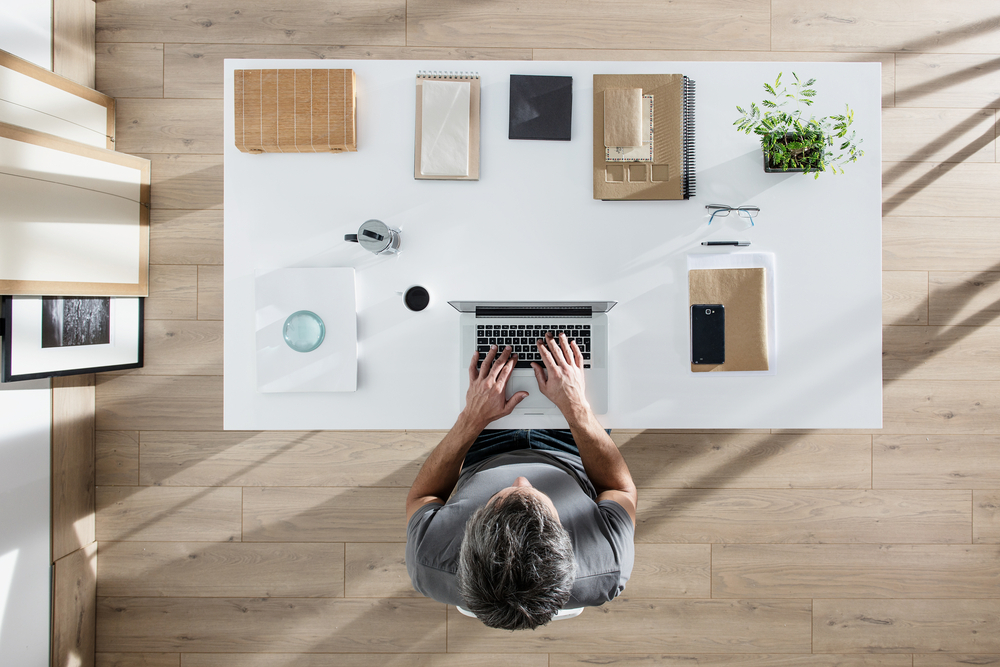
This is the rawest version of a minimal workspace. All you need is a good desk and a good chair. That’s it.
No monitor arms, no cable trays, no decorative plants. Just you and your laptop on a flat surface.
This configuration is particularly effective for people who are easily distracted, work in small rooms or prefer to start minimalism from the ground up.
What you need:
- A clear, minimalist desk (white, wood or matte black are best)
- An ergonomic chair (lumbar support is key)
- A laptop or single monitor
- A notebook and a pen — kept in the drawer when not in use
Why it works: With nothing else to focus on, your eyes — and mind — have nowhere to go but your screen. There’s no visual clutter dragging your attention sideways.
Pro tip: Put everything that’s not your device and one active project in a tray or drawer. When you sit down each morning, the desk surface should be clear.
Setup 2
The Standing Desk Minimal Setup
Stay Organised at Work Without Sacrificing the Clean Aesthetic
Standing desks have become one of the most sought-after productivity tools over the last decade — and they work beautifully alongside a minimal approach.
The key here is to keep the height-adjustable desk as clean as the traditional setup, only with the added bonus of being able to switch between sitting and standing during your working hours.
Alternating between sitting and standing every 30 minutes alleviates fatigue and enhances focus compared to sitting all day, according to research from the University of Waterloo.
What you need:
- A motorized standing desk (a manual crank works too)
- An anti-fatigue mat (to stand in comfort)
- One monitor attached to a single monitor arm (thereby freeing up desk space)
- A wireless keyboard and mouse
- Cable management clips to hold cords out of sight under the desk frame
Why it works: The monitor arm is what makes this setup so effective. By raising your screen up off the desk surface, you immediately free up a clear, open workspace underneath it. Your desk is a stage — and you can furnish it with only what you need.
Pro tip: Route your charging cable through a small desk grommet and keep the cable concealed. The simple, clean look is ruined at a stroke by the presence of a single visible wire.
Setup 3
The Dual-Monitor Minimal Setup

Two Screens, No Clutter — Here’s How
Most people assume that having two monitors means a really cluttered desk. However, a well-planned dual-monitor minimal workspace is one of the most powerful setups you could create.
The trick? A dual monitor arm which keeps both screens together. This gets rid of two monitor stands on your desk and clears enormous amounts of space.
This is best for writers, coders, designers, video editors or anyone who gets work done with reference material open on one screen while working on another.
What you need:
- A good dual monitor arm (Ergotron and Amazon Basics have decent, affordable options)
- Two identical monitors (same brand and size for a uniform aesthetic)
- A docking station (to help reduce the amount of cables)
- One USB-C cable from laptop to docking station
- Keyboard and mouse in matching color tones (either all black or all white)
Why it works: If you remove the monitor bases and thread cables through a single hub, the desk looks completely open. You have the functionality of two screens without the visual clutter.
Pro tip: Match both monitors for brightness and color temperature. Mismatched screens are jarring to the eyes and lead to more eye strain.
| Setup | Best for | Key item | Budget range | Clutter risk |
|---|---|---|---|---|
| Desk & Chair Only | Students, beginners | Laptop | $100–$400 | Very low |
| Standing Desk | Remote workers, health-focused | Monitor arm | $400–$900 | Low |
| Dual Monitor | Coders, designers, writers | Dual monitor arm | $600–$1,500 | Medium |
| Cozy Corner | Creatives, writers, readers | Warm lighting | $150–$500 | Low |
| Wall-Mounted | Small spaces, apartment dwellers | Floating desk shelf | $80–$350 | Very low |
| Outdoor / Cafe | Freelancers, digital nomads | Laptop stand | $50–$200 | Naturally low |
Setup 4
The Cozy Corner Minimal Setup
Warm, Simple, and Surprisingly Effective
Not every workspace should feel like a tech lab. Sometimes the most fruitful setting is a corner that feels warm and inviting — at least so long as it’s clutter-free.
The cozy corner minimal setup is all about warmth and simplicity. It’s a favourite of writers, students and creatives who need a quiet headspace to do their best thinking.
What you need:
- A small wooden or white desk tucked into a corner
- A comfy cushioned chair (not necessarily ergonomic — comfort is the priority here)
- A warm desk lamp (light temperature around 2700K–3000K feels cozy and less harsh)
- One tiny plant (optional — one succulent or cactus adds life without mess)
- Noise-canceling headphones
Why it works: The corner placement means that you see only two walls in your peripheral vision, not a whole room full of distractions. Combined with warm lighting, this setup puts your brain into a “settled” state — ideal for long writing stints or deep study.
Pro tip: Choose a light color palette. A white wall or wood tones plus a matching desk ensure visual harmony. Stay away from busy wallpaper or heavy artwork straight ahead.
The One-Plant Rule
If you feel the urge to add greenery, add no more than one small plant. Studies through the Journal of Environmental Psychology have shown a plant on a desk can reduce stress by up to 37%. But one plant too many becomes visual noise again. One plant, one location — end of story.
Setup 5
The Wall-Mounted Minimal Setup
The Ultimate Small-Space Productivity Hack
If you live in a small apartment, a shared space or a bedroom that’s also your office, the wall-mounted setup may be the smartest solution out there.
Instead of a freestanding desk, you mount a floating shelf to the wall at desk height. This makes for a clean workspace that, when not in use, almost disappears into the wall.
What you need:
- A floating wall shelf (60–90 cm wide is ideal)
- Heavy-duty wall anchors rated for 20 kg or greater
- A lightweight laptop stand or compact monitor
- A foldable chair you can tuck away
- A single power strip mounted under the shelf (out of sight)
Why it works: The “desk” has no legs, leaving the floor underneath completely open. This allows your room to feel doubly spacious and keeps the workspace feeling airy. It also imposes discipline — there’s simply no room for clutter.
Pro tip: Hang a small pegboard above the shelf to hold accessories such as headphones, a pen and a small notepad. Pegboards are infinitely customizable and keep everything off the shelf surface itself.
How Strong Are Wall-Mounted Desks?
Yes — if installed properly. Use wall studs whenever possible. Hollow-wall anchors rated for 15–25 kg work fine for a laptop and light accessories. The trick is to never lean on the shelf or place any heavy item (like a large monitor) on it unless you know the weight rating first.
Setup 6
The Outdoor and Cafe Minimal Setup
Take Your Minimal Workspace Anywhere
The last setup breaks all the rules about “home offices” — because it is not at home. The outdoor or cafe minimal workspace is designed for freedom.
Freelancers, digital nomads and people who find four walls suffocating often do their best work in a slightly unpredictable environment. A coffee shop, a library, a garden, a balcony — all of those are valid workspaces when you build the habit correctly.
What you need:
- A lightweight laptop (preferably below 1.5 kg for portability)
- A slim laptop stand (raises the screen to eye level — crucial for posture)
- A compact wireless keyboard and mouse
- Noise-canceling earbuds or headphones
- A small backpack with a single main compartment for your gear
- A portable power bank or knowledge of nearby outlets
Why it works: In a public space, the social pressure to appear busy actually helps you focus. This is known as the “library effect” — being in proximity with other focused people makes you more focused. And you’re required to travel light, which naturally restricts what you can clutter your space with.
Pro tip: Choose the same cafe or outdoor spot every time. Your brain will start to associate that place with focused work, and you’ll be in productivity mode faster each visit. This is termed “context conditioning,” and it’s one of the most effective focus hacks that actually works.
5 Universal Rules for Any Minimal Workspace
These five rules apply to any of these setups, regardless of which one you choose. Follow these, and your minimal workspace will remain minimal over the long haul.
Rule 1: One Surface, One Purpose
Your desk is for work. Not for snacks, mail, books you haven’t opened or things you’re “going to put away later.” Either it stays there permanently — or it gets moved before your next session.
Rule 2: Cable Management Is Non-Negotiable
Nothing spoils a minimal setup faster than a nest of cables. Use cable ties, velcro wraps or under-desk cable trays. A single visible, messy cable draws your eye every time you sit down.
Rule 3: Use Vertical Space
Put things up, not out. Wall shelves, pegboards and monitor arms all take items off the horizontal surface and move them vertical or off the desk entirely. This opens up the work surface and makes the room feel larger.
Rule 4: Reset the Space After Every Session
Spend 2 minutes at the end of every work session returning your desk to its “zero state.” This means: notebook back in drawer, cables tucked, water glass back in the kitchen, stray items put away. The next time you sit down, you’re starting fresh.
Rule 5: Audit Once a Month
Stand in front of your desk once a month and ask: does everything here earn its place? Things have a way of creeping back. A regular audit keeps the setup honest.
Best Colors and Materials for Minimal Workspaces
The visual design of your workspace is more important than many people realize. Here’s a quick guide to what works and what doesn’t.
Best colors: White, off-white, pale gray, earthy wood tones, matte black. These colors do not vie for attention. They fade into the background, allowing your work to take center stage.
Colors to avoid: Bright red, orange or yellow on large areas. These colors accelerate heart rate and instill a sense of urgency — the antithesis of calm focus.
Best materials: Wood (warm and natural), powder-coated metal (clean and modern), matte plastics (nearly invisible). Steer clear of glossy surfaces — they catch reflections and glare that draws the eye.
Lighting: Natural light from a window to your side (not directly in front or behind) is best. In the absence of natural light, a 4000K–5000K daylight LED lamp replicates natural light and keeps you alert. Avoid harsh overhead fluorescents.
How to Transition to a Minimal Workspace Starting Today
You don’t have to completely revamp everything at once. Here’s a simple 4-step process to move toward a minimal workspace for productivity without feeling overwhelmed.
- Step 1 — Clear the surface completely. Take everything off your desk. Put it all on the floor or a nearby table. Start from zero.
- Step 2 — Only put back what you use daily. Think about your last 5 work sessions. What did you actually use? Only those items come back to the desk.
- Step 3 — Find homes for everything else. Drawers, shelves, storage boxes. Everything needs a specific home that isn’t your desk surface.
- Step 4 — Test it for one week. Work in your stripped-down space for 7 days. Notice how you feel. Adjust as needed — but resist the urge to add things back unless you genuinely need them.
Frequently Asked Questions
What is a minimal workspace for productivity?
A minimal workspace for productivity is a place where you have only the tools and things you need to do work that requires focus — nothing else. The idea is to minimize visual clutter and cognitive load so you can focus and get more done.
Must I spend a fortune to have a minimal workspace?
Not at all. Both the desk-and-chair-only setup and the wall-mounted setup can be built for less than $400. Minimalism is not about adding expensive things — it’s about removing. Actually, decluttering what you already have will probably save you money.
How many items should be on a minimal desk?
A useful rule of thumb here is the “3-item rule.” At any given time, no more than 3 items should be actively present on your desk: your main device, your current work tool (notepad, headphones, etc.) and optionally one personal element (a single plant or a glass of water). The rest is tucked into a drawer or off the desk altogether.
Is a minimal workspace suitable for creative professionals?
Absolutely. Many designers, artists and writers swear by minimal workspaces because they eliminate decision fatigue. In calm and controlled environments, your creative energy goes entirely into your work instead of navigating your surroundings.
What is the single biggest mistake most people make when setting up a minimal workspace?
The biggest mistake is replacing clutter with new “minimal” acquisitions — and ending up with just as much stuff. Real minimalism begins with subtraction, not addition. Before you purchase something new, ask: is there a way to do this by getting rid of something I already own?
Does a minimal workspace have to look cold or boring?
No. Warmth and minimalism can very much live together — the cozy corner setup proves this. A single warm lamp, natural wood tones and one small plant can help a space feel welcoming and personal without evoking clutter. Minimalism is about intention, not sterility.
Can you have personal items in a minimal workspace?
Yes — in small, purposeful doses. One framed picture, one motivational item, one plant. The rule is to pick your personal things purposefully and place them mindfully. When everything on your desk was chosen intentionally, nothing seems out of place.
Putting It All Together
There is no one-size-fits-all for the right minimal workspace for productivity. It depends on who you are, how you work, and what type of environment is most conducive to your thinking.
The simple desk-and-chair setup might work well for a student. A remote software developer might require the dual-monitor arm setup. A writer may discover that their best thinking occurs at the cozy corner bathed in warm light with a single small plant.