
Have you ever sat down to work and felt completely overwhelmed before you even really got going? It can be a messy, cluttered desk. It yanks your attention in ten directions at once. Your brain recognizes the chaos and reflects it.
That is where minimalist workspaces come in.
A minimal workspace doesn’t mean sitting in a cold, empty room that looks like a furniture showroom. It’s about retaining only what you need, when and where you need it, to free your brain up to focus on what matters — your work.
In this tutorial, you’ll learn about four minimal workspaces used daily by real people. Each one suits a different lifestyle, budget and kind of work. No matter if you write, code, design or video call all day there’s a clean setup here for you.
For more inspiration and setup ideas, visit Minimal Workspaces — a dedicated resource for building focused, clutter-free work environments.
Why Your Workspace Influences the Way You Work
Before diving into the four setups, it’s important to know why your physical environment matters so much.
Research from Princeton University found that clutter competes for your attention. Every additional object on your desk is a little distraction. Your brain continues to process it, even when you believe you are tuning it out.
A clean, minimalist workspace takes away that competition. Only you and your task remain.
People are more likely to sustain focus when they work in organized spaces. They feel calmer. They make fewer mistakes. And yes, they tend to do more in less time.
You don’t need an expensive home office renovation to achieve these results. You simply require the appropriate configuration for the way you operate.
Workspace 1
Single-Surface Desk Setup
This is maximum reduction of a workspace. One desk. One monitor or laptop. A keyboard. A mouse or trackpad. That is it.
No extra speakers. No sticky notes everywhere. No stacks of paper. No coffee mugs from three days ago.
What Goes On the Desk
Here’s the rule: if something doesn’t help you do your work right now, then it has no place on the desk.
A typical single-surface minimal workspace would include:
- A clean laptop or monitor on a clean stand
- A slim wireless keyboard
- A wireless mouse or trackpad
- A single notebook and one pen (set to the side)
- An unnoticeable cable management clip or tray underneath to hide all cables
That is the full list. Nothing else.
Who This Works Best For
This setup is fantastic for writers, bloggers, students and anyone who spends most of their day working within one or two apps. If a web browser, a word processor and perhaps a communication app are your daily tools, then you need nothing more sophisticated.
It is also most useful for people with short attention spans. Without the desk cluttered, you are no longer tempted to keep fidgeting with random objects.
How to Build It for Little — or No — Money
If you already have a laptop, you can build an ultra-minimal setup for less than $50. Your biggest investment is habit — the habit of cleaning your desk at the end of every workday so that you can start fresh in the morning.
Quick tip: Use a small tray or drawer inside your desk to hide things you may need, but don’t want looking at you. Out of sight really does equal out of mind.
Workspace 2
The Minimal Setup at a Standing Desk

Standing desks have surged in popularity — and for good reason. Sitting all day kills your back, neck, and energy. A standing desk will allow you to alternate between sitting and standing throughout the day, helping to keep your blood flowing and your mind active.
But a standing desk can get just as messy as a regular one. The trick is pairing it with minimalist principles.
A Few Basics of a Clean Standing Desk
A minimalist standing desk configuration appears streamlined and purposeful. Here is what belongs on it:
- A height-adjustable desk (motorized or manual)
- One external monitor at eye level
- A wireless keyboard and mouse arranged neatly in front
- An anti-fatigue mat on the floor for when you stand
- One cable channel running down the back leg to conceal all cords
No stacks of notebooks. No decorations beyond one small plant, if you want a bit of life. Nothing that does not deserve to be there.
Why Height Matters for Focus
When your monitor isn’t at the correct height, your neck angles up or down all day. This generates tension in your muscles that subtly hobbles your energy. With a properly placed monitor — where the top of the screen is at or just below eye level — this drain goes away.
The monitor arm is one of the best investments you can make in a minimal standing desk setup. It clears a whole desktop footprint, because the screen floats in the air instead of sitting on a stand. This frees up immeasurable amounts of space for the rare occasions when you need to spread out.
Who This Setup Suits
This setup is often loved by designers, video editors, developers and project managers. It works for people whose jobs involve long focused sessions, and who have a hard time keeping energy up in the afternoon.
The standing option interrupts long stretches of sitting, and research has found links between this interruption and improved cognitive performance and less fatigue.
Cost range: $500 – $700 full setup
A good adjustable desk ranges from about $300 to $500. A decent monitor arm costs another $40 to $100. Wireless peripherals bring the total to about $500–$700. More affordable options such as a fixed-height standing desk or a desk riser can lower this quite a bit.
Workspace 3
The Laptop Corner Nook
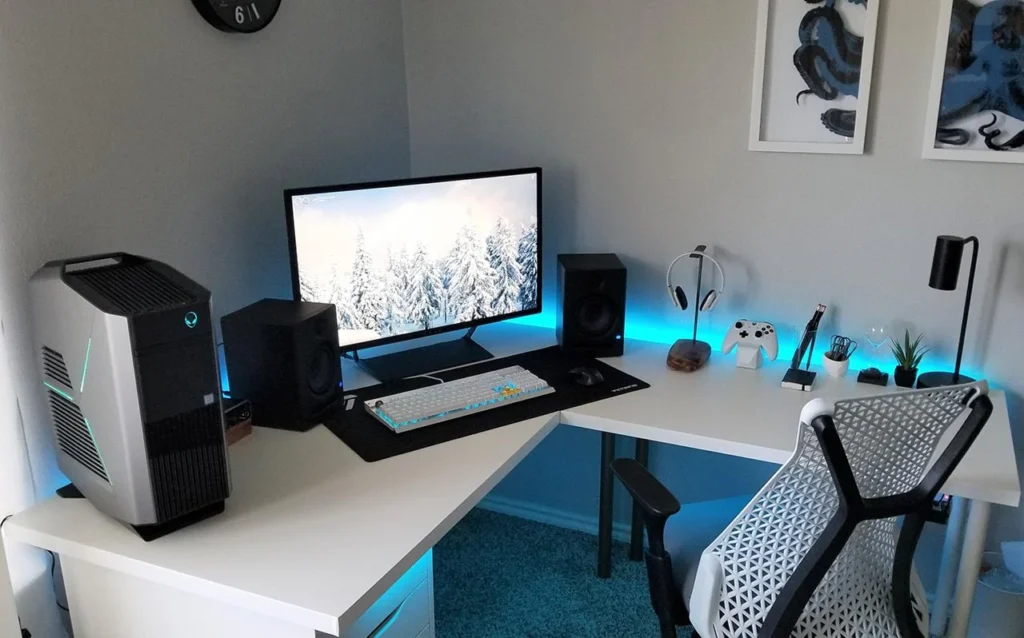
Not everybody has a separate room for a home office. And that is completely fine.
The laptop corner nook is a small-space, minimal workspace — a corner of any bedroom, a seat at a kitchen table or the shelf in an overstuffed closet. The thinking is that you carve out, however small, a defined, intentional work space in your home.
Strategies for Setting Up a Small Space as a Genuine Workspace
The primary drawback of a laptop nook is that it can get one in trouble by blurring the line between work and rest. When your bedroom is your office too, you never take your brain out of “on” mode. That’s why intentionality is so important.
You have to train your brain to know this particular corner means business. Here is how to do that:
- Start with a consistent spot. Sit in the same spot every time you work. Your mind will start to associate that place with focus mode.
- Add a small barrier. A simple bookshelf, a room divider panel or even just a designated chair that you use only for work can serve to define the space.
- Keep the surface clear. When you are working, place the laptop on a desk or table. When you’re finished, close it up, put it away, and the surface is clear again.
- Use good lighting. Even a small desk lamp pointed at your screen helps reduce eye strain and also indicates “work mode” when it’s on.
The Minimal Laptop Nook Essentials
This setup is intentionally ultra-lean:
- A small desk or sturdy table (even a repurposed dining chair and lapboard will do)
- Your laptop
- A single good pair of noise-canceling earbuds or headphones
- A portable laptop stand to get the screen up to your eye level (this cuts down a lot on neck strain)
- A foldable Bluetooth keyboard if you are using the stand
Zero cost if you use things you already own, or $100 to $150 tops if you buy a portable stand and wireless keyboard.
The Key Rule When Working in a Laptop Nook
Pack it up every single day. Never leave your laptop open on the desk overnight. The ritual of packing it down every night and setting it up in the morning provides concrete mental boundaries between work time and home time.
Just this one thing will help how rested and productive you feel the next morning.
Workspace 4
The Tidy Dual-Monitor Setup
Two screens may seem like the antithesis of minimalist. But hear this out.
A dual-monitor setup — used correctly — is not about excess. It is about reducing friction. You stop flipping between tabs constantly because you can have your reference material on one screen and your actual work on another. That tab-swapping is a huge invisible productivity drain.
A minimal dual-monitor workspace keeps everything else simple, so the two screens are the only addition to your environment.
What One Minimalist Dual-Monitor Setup Looks Like
The discipline is exacting here: the added screen wins its real estate by eliminating the need for everything else. That’s the rule — if you’ve got two monitors going, every other aspect of the desk has to be cleaner to compensate.
This means:
- Both monitors on arms instead of stands, freeing up desk space
- All cables run through a single cable management solution or hidden with clips
- Desk surface is free of decorative items
- A single wireless keyboard and mouse positioned in the middle of both screens
- A small USB hub mounted under the desk if you still need ports
The end result is a desk with two monitors floating cleanly in the air, keyboard and mouse in the center, and absolutely nothing else on top of it. It looks sleek. It functions brilliantly.
Who Should Choose This Setup
It should be most beneficial for developers, data analysts and financial professionals, or anyone who regularly shuttles between multiple applications at once. The dual-monitor setup has its merits when you really need to see two windows side by side — not when what you want is simply the feel of multiple displays.
Just be honest with yourself before you build this setup. If you realistically work on one screen at a time, a single monitor will serve you better and keep your desk cleaner.
Cable Management Is Non-Negotiable Here
Cable mess is the number one reason dual-monitor setups look cluttered. Two monitors, a computer, a keyboard, a hub — the cables add up quickly. By spending about two hours routing cables correctly when you first set this up, you will save yourself years of looking at a tangled mess.
Use velcro cable ties (not plastic zip ties, which you can’t adjust later), adhesive cable clips under the edge of your desk and a small cable management tray mounted underneath. Label each cable with a small tag so you never need to trace them again.
5 Rules All Minimal Workspaces Live By
Regardless of which of the four setups you choose, these five principles apply to all of them.
- Everything has a home.Every item on your desk is there for a good reason and has a designated spot. Nothing drifts.
- Wires are hidden.Visible cables are visual noise. Run all wires out of sight.
- Clear out at the end of every day.Begin every morning with a fresh, clean surface. It’s a practice, not a one-off project.
- Buy less, choose better.Buy one great thing instead of five cheap things. A decent chair, a quality monitor, a keyboard you actually enjoy typing on — these compound over years of usage.
- Digital minimalism matches physical minimalism.A clean desk with a cluttered desktop screen is only halfway there. Close unused tabs. Organize your files. Keep your screensaver or desktop background simple and soothing.
How to Move to a Less Cluttered Workspace Today
You do not need to wait for the weekend or for a new desk to arrive. You can begin today, with what you have.
- The 10-Minute ClearSet a timer for ten minutes. Clear your desk surface of everything and place it on the floor. Just return what you really need for today’s work. Everything else goes into a drawer, on a shelf or is thrown away. Do this just once and you will feel the difference immediately.
- Deal with the CablesCheck underneath or behind your desk. Count the cables. Purchase a pack of adhesive cable clips for about $8 and spend 20 minutes routing them. This one change completely transforms the look of most desks.
- Select Your Workspace TypeUse what you have read to choose which of the four workspace types best aligns with your life. Think about your budget, your available space and the type of work you do most regularly. You don’t have to create the perfect setup all at once. Begin with the essentials, then build intentionally.
- Set a Weekly ResetCarve out 10 minutes each Friday afternoon (or Sunday evening) to refresh your workspace. Clean it out, wipe it down and get it ready for the week to come. It takes virtually no time and keeps your setup from drifting back toward clutter.
Common Mistakes People Make with Minimal Workspaces
Even with the most sincere intent, some habits silently unravel a minimal setup.
- Purchasing “productivity” gadgets you don’t need. Minimalism does not require a $200 desk organizer, a novelty pen holder or an ornamental clock. These are clutter with better advertising.
- Adding items gradually over weeks. This is called “clutter creep.” One thing arrives and seems innocuous. Then another. Then another. Before long, you find yourself at a crowded desk again. Your defense is your weekly reset habit.
- Ignoring ergonomics in the name of minimalism. A minimal workspace is not a clean desk that destroys your neck and wrists. Ensure your monitor is at eye level, your chair supports your lower back and your keyboard and mouse are at the correct height. Ergonomics and minimalism coexist in harmony, not in opposition.
- Going too extreme too fast. If your desk hasn’t been cleared in years, clearing it completely in one day and attempting to maintain a monastic setup is unsustainable. Be gradual. Remove a few items each week. Start the habit small and it will stick.
FAQs About Minimal Workspaces
Q: Do I have to spend lots of money to create a minimal workspace?
Not at all. In fact, two of the four setups in this guide — the single-surface desk and the laptop corner nook — will cost you $0 if you already have a computer or laptop. At its core, minimalism is about consuming less — not more.
Q: Are minimal workspaces good for creative work such as drawing or design?
Yes, but with one adjustment. Creative work occasionally needs physical reference materials, color swatches or sketching space. The trick is to take these out when you need them and put them away when you don’t. Having a tray or drawer for creative supplies will keep your desk clear between projects.
Q: How do I prevent my desk from getting cluttered again?
The daily clear and weekly reset are the best defense. At the end of each workday, take two minutes to return things to their homes. Do a full surface wipe and check on Friday afternoons. These habits require nearly zero time but compound into months of clean, focused working conditions.
Q: What if I share a room or live with other people — can I still have a minimal workspace?
Yes. This is precisely what the laptop corner nook is intended for. Set up a small designated space that is yours for work, keep it clean and put it away when your workday ends. Even in a shared environment, a compact delineated nook can serve as your productive, focused zone.
Q: What is the most important thing to invest in for any minimal workspace?
Your chair. You’ll sit in it for thousands of hours in the years ahead. A high-quality chair with proper lumbar support saves your back, minimizes fatigue and keeps you comfortable during long work sessions. A good monitor on an adjustable stand is the next most important investment after your chair.
Q: Does a minimalist workspace mean no personalization whatsoever?
Not necessarily. One or two items that have personal significance — a small plant, a framed photograph, one decorative object — is acceptable if it truly brings you joy to see it. The goal is not sterility. The aim is getting rid of the noise so what’s left has some actual significance.
Q: Which of the four setups is best for people who are video calling all day?
What works best for video calls are the single-surface desk setup or the standing desk setup. Each makes it easy for you to control your background and position your camera at a clean, professional-looking angle. A monitor arm allows the camera to be at eye level, which comes across a lot better on screen than the upward angle that most laptops create.
Your Workspace Shapes the Work You Do
A messy desk is not a marker of a busy, creative mind. It is a drag on your attention, your energy, and your output.
A clear workspace — whether that’s a bare single-surface desk, an uncluttered standing setup, a little laptop nook or a streamlined dual-monitor configuration — provides your brain with the gift of focus. In a calm environment, thinking also calms down.
Start small. Clear your desk surface today. Hide the cables. Pick a setup that mirrors your real life — your budget, your space, the kind of work you do. Focus on one good habit at a time.
The best minimal workspace is not the one that looks the most impressive in a photo. It’s the one you can actually stick with, day in and day out, because it suits how you work and helps bring out your best.
Your desk is where all your ideas come to life. Keep it ready for them.