The common perception is that focus requires greater effort.
It is not.
Focus is about making sure those things never have the opportunity to break it. That’s the essence of setup minimalism — shaping your physical and digital environment to make deep, uninterrupted work the default.
You don’t need a fancy standing desk. And you don’t need to invest hundreds of dollars on gadgets. What you want is less stuff, more thoughtfully arranged.
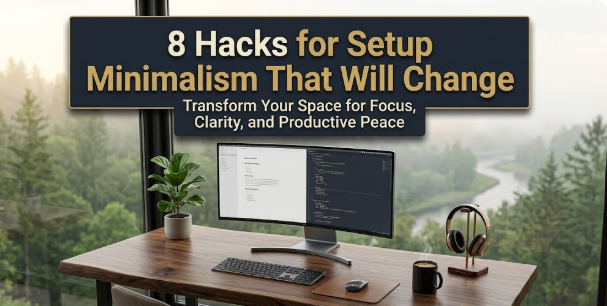
In this guide, we share 8 tried-and-tested setup minimalism tricks that improve your focus from the instant you sit to tackle some work. They are all practical, low-cost and anchored in how the brain actually works on the environment.
Let us get into it.
Your Setup Is Silently Wrecking Your Focus
Before the tricks, it’s good to grasp the problem.
Your brain is continuously scanning its environment. It does this automatically — there’s no way to turn it off. Anything in your visual field gets a little bit of your attention budget, whether you want it to or not.
Researchers at Princeton Neuroscience Institute discovered that physical clutter essentially competes directly with the task in front of you for neural resources. The more visual noise you have in your space, the harder your brain has to work just to stay headed in a straight line.
This is not just a feeling. It is measurable cognitive drain.
Then multiply that onto a mess of a desk, a cluttered computer desktop, an unruly browser, multiple screens notifying us of updates and our phone ringing within arm’s reach. Your mind is at battle with the environment around it constantly.
Setup minimalism addresses this by altering the environment — so your brain can stop resisting and start concentrating.
This is the overview before we analyze each trick in detail.
Tip 1 — The One-Task Desk Rule

Go and stand in front of your desk. Count everything on it.
The average person has 10, 20, even 30+ items — notebooks from last month, charger cables, snacks, random papers, a water bottle, a mug, and at least one book they were going to read but didn’t. Sticky notes dating back to 2022.
Each and every object is a potential visual interruption.
The one-task desk rule is like so: your desk contains nothing but the items you need in that moment, and nothing else. Your desk has your laptop and a glass of water, if you are writing. If you are drawing, it has paper and a pen. The rest is in a drawer, or on a shelf, or in a box.
How to Make It Stick Without Losing Your Mind
You don’t have to turn your desk into a blank-walled cell in a monastery. The aim is “less,” not “nothing.”
A good starting point: take everything off your desk. Put it all in a box. When you really need something out of the box, take it out — but do only that for a week. By the end of the week, whatever remains in the box likely doesn’t need to be on your desk.
Most people are surprised by this process alone. They discover that half the items on their desk are there out of habit.
A study published in the Journal of Environmental Psychology discovered that employees working in less cluttered workspaces reported much higher levels of focus and significantly lower stress than those exposed to messy environments. The effect was particularly pronounced during complex cognitive tasks.
A more organized desk is not merely about being neat and tidy. This is real cognitive enhancement.
Trick 2 — Use a Single Monitor (Not What You Think)

Here’s a perspective you won’t see in most productivity articles: more screens don’t equal more output.
A second monitor is helpful for certain tasks — when you want to refer to a document as you write, or keep an eye on a live dashboard while coding. But for nearly all focused work, a secondary screen incurs an ongoing split-attention cost.
In front of you are two screens, and your brain divides its visual field. The second screen moves at the periphery, causing involuntary glances. Context-switching between screens, even in a quick, instinctual way, disrupts deep focus.
When One Screen Wins
Setup minimalism for focus means selecting the appropriate tool for the task at hand, not defaulting toward “more is better.”
Here’s an experiment to try: for a full week, do your most important daily task on one screen only, with the second monitor off or turned away. Monitor your ability to maintain focus without distraction.
Most people are surprised. The single-screen limitation does encourage better task management. You think more critically about what you keep open. You close unnecessary windows. You dedicate yourself to one task at a time.
For a proper minimal workspace setup, if a home office desk is where you work most, check out Minimal Workspaces for great design principles on building environments that support deep focus — well worth exploring alongside these tricks.
The sweet spot for most knowledge workers: one quality monitor at the right height, a clean desktop background, and a full-screen app focused on the task.
Tip 3 — Command Your Light and Color
Your lighting setup is doing more for your focus than you may think.
Harsh overhead fluorescent lighting raises cortisol, the stress hormone. Cool, blue-tinted light signals “daytime alertness” to your brain — helpful in the morning but overstimulating at night. Warm lighting in the late afternoon and evening naturally helps your nervous system settle into a more sustainable work mode.
And then there’s the screen itself. The default brightness on most monitors is maximum and the screen is staring you directly in the eye at close range for 8+ hours. That’s a recipe for eye strain, headaches and early-afternoon mental fog.
The Light Setup That Works
This is what light setup minimalism looks like in practice:
| Time of Day | Recommended Light |
|---|---|
| Morning (before 10 AM) | Bright and cool-toned light, which helps increase alertness |
| Midday (10 AM–2 PM) | Natural daylight or neutral white |
| Afternoon (2–5 PM) | Slightly warmer, less intense light |
| Evening work | Warm amber tones, reduced screen brightness |
On your monitor, enable the night mode function of your operating system or use a utility like f.lux that automatically changes color temperature throughout the day. Reduce brightness to roughly 70% of maximum as a baseline — most people find that level more comfortable and sustainable than full brightness.
Place your desk so the natural light is coming at you from the side, not directly behind or in front of your screen. Glare is a hidden focus killer, forcing constant micro-squint adjustments all day.
Trick 4 — Curate Your Sound Environment Intentionally
The vast majority of people allow their sound environment to happen to them.
There’s a TV running in the background. The open-plan office hums with conversations. Three different devices ping with notifications. A neighbor is drilling something.
Sound is among the most powerful focus disruptors because your brain processes it subconsciously. You can never choose not to hear. You can only pick what you listen to.
Three Sound Strategies That Really Work
For sound, setup minimalism means selecting one of three intentional environments:
True silence. That works best for highly demanding analytical work — writing, coding, deep problem-solving. Noise-canceling headphones without anything playing are one of the most underrated focus tools available. Cambridge University research showed that even subtle background speech dramatically lowers performance on reading comprehension tasks.
Consistent background noise. A constant hum — brown noise, white noise, the background chatter of a coffee shop — can boost concentration for many people. The key word is consistent. The brain acclimatizes to constant noise and learns to filter it out. Unpredictable sounds (conversations, music with lyrics) remain in the foreground.
Instrumental music. Instrumental music, at moderate volume, is also effective for repetitive or creative work. Anything that relies heavily on language processing — reading, writing, coding — is best done in silence or to non-lyrical sound, since words in music compete directly with the words on your page.
Decide on your strategy before you sit down. Refrain from passively letting the soundscape around you impose itself on your ears.
How the Quality of Your Setup Impacts Length of Focus
According to research published by the American Psychological Association, environmental stressors — including cluttered, noisy workspaces — are directly linked to reduced cognitive performance and higher stress. The difference between a messy, noisy workspace and a totally sparse one isn’t incremental — it’s the difference between 8 minutes of uninterrupted focus and over 50. That adds up over the course of a workday.
Hack 5 — Create an Analog Capture Zone
Here’s one of the more underrated setup minimalism tricks for focus: maintain a notepad within arm’s reach of your workspace, and use it as an overflow valve for your brain.
Here is the problem it solves. Random thoughts constantly surface during deep work. You remember that you have to call somebody. You have a better idea for another project. You remember that you didn’t respond to a message.
These are all potential derailments. You break focus if you stop to act on it. If you try to hold it in your head, it just lingers there and eats your attention residue.
A physical notebook provides a third option: write it down in two seconds, and get back to work. The thought is safe. You can deal with it later. Your brain can let it go.
The Capture Zone Setup
Every day, put a small notebook and one pen in the same place. That is it.
When a thought surfaces during focused work, you note it down — one line, no explanation — and get back to what you were doing. After the focus block ends, you process the list.
This kind of technique is sometimes referred to as a “brain dump” or a “capture system,” and it’s central to productivity systems like David Allen’s Getting Things Done. The central insight remains the same: your brain is a lousy storage device. Offload those things that don’t need to be in your head right now.
Digital note-taking apps can do this as well, but opening your phone or switching apps to capture a thought often ends up being a two-minute rabbit hole. A notebook removes that risk altogether.
Hack 6 — The Device Distance Principle
This one concerns your phone, and it’s more powerful than many of us want to acknowledge.
Research from the University of Texas at Austin found that just having your smartphone on your desk — even face down, even silent — measurably reduces your available cognitive capacity. Seeing the phone itself creates a persistent low-level urge to check it. Resisting that urge takes mental effort.
The solution is not discipline. It is distance.
The Three Zones
Device setup minimalism works in three zones:
| Zone | Phone Location | Effect |
|---|---|---|
| Zone 1 (worst) | On your desk, screen up | Constant visual cue and maximum drain |
| Zone 2 (mediocre) | Pocket or bag nearby | Within reach, but still tempting |
| Zone 3 (best) | In another room, or at least three metres away | Out of the way and out of mind |
If you need your phone to receive calls when you’re working, restrict notifications to calls from specific contacts only. Then put it out of sight — ideally on a charger in another part of the room.
The same goes for tablets and smart watches that show notifications. Any device that raises interruptions in your visual field or on your wrist needs to be removed or silenced whenever you’re doing focused work.
A study in the Journal of Experimental Psychology found that even without looking at their phones, those who received audible or vibrating notifications were as distracted as people who answered a call. It is not the checking that is the problem — it is the alert itself.
Hack 7 — Create a Pre-Work Ritual That Gets Your Brain Ready
Your brain does not switch instantly from relaxed mode to deep focus mode. It requires a signal — a consistent cue that communicates: we are beginning now.
That’s the job of a pre-work ritual. It’s a simple, repeatable series of actions you take before every period of deep work. Over time, through repetition, the ritual itself becomes the focus trigger. Your brain then associates the routine with concentrated work and begins ramping up before you even sit down.
What Makes a Good Pre-Work Ritual
It takes at most 5–10 minutes to complete. It needs to be consistent — same steps, same order, every time. And it should be connected to your physical setup.
Here is an example sequence:
- Clear the desk down to only those tools you need for today’s work.
- Fill a water glass and set it in the same spot.
- Open your notebook to a fresh page.
- Write the most critical task for the session at the top.
- Put on headphones (silence or selected sound environment).
- Start a timer.
That is six steps. They take about four minutes. But after a few weeks of consistency, step one — clearing the desk — begins to feel like the key turned in the ignition. Your brain starts switching gears before you’ve even finished.
The pre-work ritual is one of the few setup minimalism tricks that compounds over time. The longer you keep it up, the quicker and deeper the focus response becomes.
Trick 8 — The End-of-Day Reset: Closing Every Loop
For most people, the end of the workday is as simple as closing a laptop and walking away.
And then they go through the evening with a low rumble of unfinished business playing in the background. Loose ends they didn’t tie up. Things they were supposed to have written down. What they will have to remember tomorrow.
That mental chatter does not remain at the desk. It follows you.
An end-of-day reset is the intentional closure of every open loop before you log off. It’s brief — 10 minutes tops — and it has a dramatic impact on evening unwinding and next-day preparedness.
The End-of-Day Reset Routine
| Step | Action | Time |
|---|---|---|
| 1 | Scan your desk and clear it to baseline minimal | 2 min |
| 2 | Review your notebook capture list — schedule or discard each item | 3 min |
| 3 | Write tomorrow’s single most important task on a sticky note | 1 min |
| 4 | Close all browser tabs and apps | 1 min |
| 5 | Say out loud or write: “Shutdown complete.” | 30 sec |
That last step — the verbal or written declaration of shutdown — may sound strange, but it’s effective. This is a strategy from Cal Newport’s Deep Work framework. That explicit signal tells your brain it no longer needs to think about work. Without it, the brain considers “end of day” ambiguous and continues processing.
The end-of-day reset also changes your next morning. Instead of starting your day with the previous night’s mess, you show up to a clear desk where a single task is already written out and waiting. And that is a strong setup minimalism win.
Applying All 8 Tricks to a Realistic Setup Strategy
You need not do it all simultaneously. Here is a staggered one-week rollout that makes each trick feel achievable:
| Day | Action |
|---|---|
| Monday | Trick 1 — Clear the desk down to one-task only |
| Tuesday | Trick 5 — Place a notebook and pen on your desk |
| Wednesday | Trick 6 — Move your phone out of arm’s reach |
| Thursday | Trick 4 — Intentionally choose your sound environment |
| Friday | Trick 3 — Adjust the lighting setup |
| Saturday | Trick 7 — Design your pre-work ritual |
| Sunday | Trick 8 — Practice your end-of-day reset |
| Following week | Trick 2 — Experiment with single-screen work |
By the end of week one, seven of the eight setup minimalism tricks are in place. By the end of week two, all eight will be working together — and you’ll feel a cumulative effect in your ability to stay focused.
The Larger Shift Behind Setup Minimalism
There is one thread that links all eight of these tricks.
They have nothing to do with discipline, motivation or waking up at 5 AM. They are about switching the default. Your environment’s default is distraction, right now. Clutter pulls at your eyes. Devices demand attention. Sound interrupts thought. At the end of the day, there are loose threads everywhere.
Setup minimalism turns all that on its head. It makes focus the default — the easier path.
When your desk is clear, there is nothing to distract you. When your phone is in another room, there is nothing to reach for. By the time your ritual starts, your brain already knows what will follow. And when the day ends clean, your evening is really your evening.
That is not merely a productivity gain. It is a quieter, calmer, more methodical way to work.
Common Questions About Setup Minimalism for Focus
Q: Does setup minimalism only apply to people who work from home?
Not at all. These tricks all apply to offices as well. No matter where you work, you determine your desk surface, your use of headphones, the location of your phone, how you set things up before getting to work and how things look at day’s end. The single-monitor and lighting tricks might be more difficult to pull off in a shared office, but the core habit-based tricks are fully portable.
Q: Is it better to have a perfectly empty desk, or is some personalization good?
Personalization is all good as long as it has a purpose. One plant, one meaningful object or a photo that inspires calm incurs minimal cognitive overhead. The issue is accumulation — stuff that found its way onto the desk without intent and then just got stuck. The test: would you miss it if it were gone? If not, then it likely should not be there.
Q: I have ADHD — does setup minimalism work or is it more complicated?
Research indicates that setup minimalism is especially beneficial for those with ADHD, as external stimuli can have a greater grip on attention. A decluttered workspace with an intentional pre-work ritual can work wonders. That said, ADHD is a diverse condition and what works for one person won’t work for another — these tricks are a helpful place to begin, but might require supplementing with other strategies.
Q: When do these changes start to take effect?
Within 2–3 days of clearing your desk and keeping your phone at a distance, most people find a difference. The pre-work ritual takes 2–3 weeks of consistency to become a reliable focus trigger. The end-of-day reset benefits are felt right on the first evening.
Q: I need multiple tools and documents to do my job. How do I apply the one-task desk rule?
The one-task rule is about visibility, not existence. You can have a filing system, a drawer containing materials, storage nearby — but only the tools needed for the current task should be on the desk surface. Consider the desk as “active workspace” and everything else as “storage.” Only the active task lives on its surface.
Q: Should I care about the kind of chair or desk height for setup minimalism?
They are important for physical health and comfort, which in turn contributes to focus — discomfort is a distraction unto itself. An ergonomically sound setup (monitor at eye level, feet flat on the floor, forearms generally parallel to the desktop) removes one additional source of background friction. But those are refinements, not the essence. First try the tricks in this article.
Q: Is this approach suitable for creative work, or only for structured tasks?
This approach is particularly effective for creative work. Creative thought needs long periods of uninterrupted mental space — the kind that is nigh impossible to produce in a cluttered, high-stimulation setting. Many writers, designers and artists work in extremely stripped-back environments precisely because the empty space is cognitively activating rather than deadening.
Wrapping Up
Focus is not a personality trait. It is not a matter of whether some have it and others don’t.
It has been shaped by environment. The right environment is what helps us achieve focus.
These 8 proven setup minimalism tricks give you a complete blueprint:
A desk that contains just what the work requires. One screen to unify your visual field. Light that complements your brain instead of working against it. Sound of your choosing, not whatever happens to be available. A notebook that holds the overflow of your brain. A phone that is out of reach. A ritual that signals to your brain that it is time to start. An end-of-day reset that closes every loop.
None of these are expensive. None necessitate a sweeping life overhaul. They are small, intentional acts of environmental design that compound into something larger: a workspace where sliding into deep focus is easy, natural and repeatable.
Start with one trick today. Clear your desk. Move your phone to another room. Before you shut your laptop tonight, write down tomorrow’s task.
The environment shapes the work. Build the right one.