Picture this. You sit down at your desk to do some work. But before you even sit down at your laptop, you’re looking up from a tangle of cables and sticky notes and empty coffee cups, a stapler you haven’t used in a year, and three pens that don’t work.
Sound familiar?
A messy desk does more harm than many people think. Research indicates that a disorganized workspace makes you more stressed, stifles your focus, and creates barriers to getting into the flow of productive work. The encouraging part is that you don’t have to shell out tons of money or overhaul your entire life to get it back on the right track.
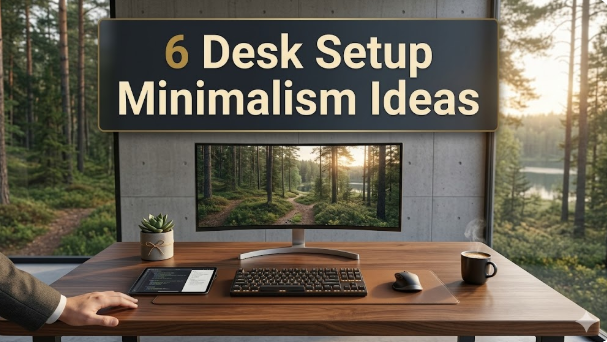
These 6 desk setup minimalism ideas are all practical, easy to apply, and will work whether you’re working from home, at school, or in an office. No extreme makeovers. No throwing everything away. Just savvy, purposeful decisions that clean up your desk — and your brain — a whole bunch.
Let’s get into it.
The Desk Setup Matters More Than You Might Realize
It’s worth taking a moment to explore the true cost of an untidy desk before diving into these ideas.
Cluttered, messy workspaces distract your focus in every direction. Your brain processes all of that and recognizes it as incomplete business. All the objects in your field of vision are vying for a minuscule sliver of your attention.
Minimalism doesn’t mean making your space look like a magazine shoot. It’s about getting rid of everything that doesn’t need to be there, so that the things that do can breathe.
Here’s a quick summary of how desk clutter impacts each part of your workday:
| Area Affected | What Clutter Does |
|---|---|
| Focus | Makes focusing on a single task harder |
| Stress levels | Increases anxiety even outside of work |
| Productivity | Wastes time hunting for things |
| Creativity | Overstimulated brain keeps fresh ideas from coming |
| Physical comfort | Takes up space, limiting options for ergonomic setups |
| Mood | A messy space often means a messy mind |
The best minimalism ideas for desks aren’t just good to look at. They help you literally think better, move faster, and feel calmer during the day.
Idea 1 — A Zero-Base Reset
The One Rule That Makes All the Difference
The single most potent thing you can do for your desk is to remove everything from it. Every single item. Off the desk. On the floor, on a table nearby, wherever — you just want to get it all off the surface.
This is also called a zero-base reset. And it works because you have to make a deliberate decision about every single thing you put back.
When the average person “cleans up,” they move things around. They are just moving the pile from one corner to another. A zero-base reset entirely breaks that tendency.
What Goes Back on the Desk
Once you have a clear desk, take a moment. Notice how it feels. The surface is ideally calm and unbroken.
From there, only put back the items that meet this test: “Do I use this on my desk every single day?”
If the correct answer is yes — it goes back. If the answer is anything else — it goes elsewhere. A drawer, a shelf, a storage box, or the trash.
What actually returns to the desk for most people is something like: laptop or monitor, one notebook, one pen, and maybe a water bottle or a lamp. That’s it. Everything else can stay elsewhere and emerge as needed.
The 5-Item Rule for Desk Surfaces
One of the many tips offered by minimalist workspace designers is the 5-item rule. Limit your desk surface to no more than five items at a time. That has you pick and choose, so there’s no slow creep of clutter that builds up over days and weeks.
Idea 2 — Learn to Control the Cables

Cables Are the Most Visual Noise on Any Desk
You could have the cleanest, most beautiful desk in the world — and a mess of cords will ruin it with one fell swoop. Cables are among the most common sources of visual clutter, but they’re also among the easiest to fix.
The idea here is quite simple: make cables invisible — or at least near-invisible. You don’t have to be a tech wizard to do so. A few inexpensive tools make a world of difference.
Four Tools That Get Cables Under Control
Cable clips and adhesive mounts attach to the underside or back edge of your desk and keep cords in a single line. They’re nearly free and take five minutes to install.
Velcro cable ties tie multiple cables together so they run as one clean line instead of a messy web. They’re reusable and adjustable — much better than zip ties.
A cable management tray attaches to the bottom of your desk and conceals a power strip and all your cables inside it. From the front, your desk looks utterly free of cables.
A wireless charging pad removes the need for phone charging cables on the desktop entirely. One flat pad, no cords hanging down.
Going Wireless Where Possible
Going wireless on as many devices as you can is one of the best long-term minimalism ideas for desks. You immediately eliminate cable clutter with a wireless keyboard, wireless mouse, and wireless headset. The upfront investment pays off in a permanent reduction of the visual noise on your workspace.
Idea 3 — Opt for Versatile Items Over Single-Use Ones
The Minimalist Mindset: One Thing, Many Jobs
A desk filled with junk is most commonly caused by too many single-use items. A separate stapler, tape dispenser, pencil holder, sticky note pad, phone stand, paper tray — each occupies space and does one thing.
Long-lasting minimalism ideas for desks depend on choosing items with more than one job. The fewer things you have on your desk, the more intentional each item has to be.
Smart Multi-Function Swaps to Make Right Now
Here are a few practical upgrades that bundle multiple functions into one item:
| Instead of This | Try This | Space Saved |
|---|---|---|
| Separate monitor + laptop stand | Monitor riser with built-in USB hub | Frees desk surface, adds ports |
| Phone stand + wireless charger | Combined charging stand | One item instead of two |
| Pen holder + small organizer | Minimal desk organizer with sections | Reduces items by 2–3 |
| Physical notepad + sticky notes | One quality notebook | Cuts paper sprawl in half |
| Desk lamp + phone charger | Lamp with built-in USB charging port | Removes one plug from power strip |
| Paper tray + filing pile | Digital inbox system | Removes paper from desk entirely |
Each swap on that list eliminates something from your desk without eliminating any function. That’s the guiding principle of smart minimalism.
The “One Beautiful Thing” Approach
Some minimalist designers have suggested choosing one item on your desk that you really like — a nice lamp, a quality pen, a small plant — and having that be the visual point of interest. Everything else disappears into the background. One statement piece brings personality to the desk without adding clutter.
Idea 4 — Use Vertical Space Wisely
Your Desk Surface Is Not the Only Space You Have
Most people generally think of their desk as that flat surface in front of them. But every desk has vertical space — the wall behind it, the space above the surface, and usually below it too.
Making the best use of vertical space is one of the most underrated minimalism ideas for desks. It keeps everything reachable but out of the way of the work surface.
What to Move Off the Surface and Up
A monitor arm is one of the best investments for a minimalist desk setup. It raises your screen off the desk surface completely, leaving a large flat space underneath it clear. Most monitor arms also improve your posture and screen position at the same time.
A small floating shelf above the desk can hold speakers, books, a small plant, or anything else you’d like to have in proximity but off the work surface. It adds storage without taking up any desk space at all.
Pegboards are another popular option. A pegboard attached to the wall behind your desk provides a way of hanging accessories, headphones, cables, and tools on hooks — all visible and accessible, but none of it consuming surface space.
Under-Desk Storage Done Right
The area beneath your desk is frequently underutilized. A small under-desk drawer that attaches to the underside of the surface can hold pens, a notebook, chargers, and small accessories. The desk looks perfectly clear from the outside. Everything you need is literally at your fingertips and hidden from view.
It’s a game-changer for small desks where surface space gets cramped.
Idea 5 — Create a Paper-Free (or Paper-Light) System

Paper Is the Quiet Villain of Desk Clutter
Ask most people what makes their desk feel cluttered, and they’ll point to the technology. But nine times out of ten, the real villain is paper.
Loose papers, printed documents, notebooks, sticky notes, mail, to-do lists — paper has an unexplained way of multiplying until the desk slowly vanishes underneath it. Minimalism ideas for desks that neglect the paper problem are only addressing half the equation.
Going Digital With Your Workflow
The best way to cut back on paper sitting on your desk is simply not to create so much of it in the first place. Here are a few changes that have a dramatic impact:
Move your to-do list to a digital app. Tools like Notion or Todoist, or even a basic Notes app on your phone, propel your task list off the desk and onto the screen instead.
Scan important documents instead of keeping physical copies. A free app such as Adobe Scan or Microsoft Lens transforms any paper document into a searchable PDF in about ten seconds. Once it’s been scanned, the physical copy can go in a file — or the bin.
Use one physical notebook instead of many. If you prefer to write by hand, that’s perfectly fine. But commit to one notebook. Not a pile of half-filled pads, one separate notepad set aside only for meetings, and a Post-it collection. Just one book.
The Inbox-Zero Method for Your Physical Desk
Bring the concept of inbox zero to your physical desk as well. Establish one “inbox” spot — a small tray or a dedicated folder — where all incoming paper lands. Then, once a day or once a week, process that inbox completely. File it, action it, scan it, or bin it. Nothing stays in the inbox indefinitely.
This simple system ensures paper doesn’t take over your desk and keeps the surface clear.
Idea 6 — Build Your Whole Desk Setup Around What You Do Each Day
Most Desks Are Built for Storage, Not for Work
Here’s a fact that nearly everyone overlooks: their desk is set up for storage, not for how they actually work. Things are put where they fit, not where they’re needed.
A truly clean desk setup turns this on its head. The organization of your desk should mirror the precise flow of tasks you do every day — not simply where things randomly fall.
This is the most personal of all the minimalism ideas for desks, because what works for a writer will look nothing like what works for a student or a graphic designer.
Map Out Your Daily Workflow First
Before you change anything, take five minutes to sketch out what a typical day at your desk looks like. Make a list, in order of frequency, of the tools and tasks you reach for most often. What do you touch first? What do you use constantly? What do you use once a week?
The items you use most frequently should be within reach without getting out of your chair. Things you use occasionally should be in a drawer or cabinet close by. Anything you use infrequently should be stored elsewhere entirely.
This sounds obvious. Most desks, however, are not configured this way at all.
The Three Zones of a Minimalist Desk
Visualize your desk as having three zones:
The primary zone is the area directly in front of you and within easy arm’s reach. This is where your keyboard, mouse, and monitor reside. Nothing else should permanently occupy this zone.
The secondary zone is the area around the outer edges of the desk and to either side. This is where a notebook, a lamp, and a water bottle might go — items you use frequently but not constantly.
The tertiary zone is off the desk entirely. Drawers, shelves, and storage. Everything that doesn’t need to be on the surface lives here.
Structuring your desk setup around these three zones automatically results in a cleaner, more functional setup — without needing to think too hard about minimalism at all.
What a Full Minimalist Desk Setup Looks Like
Here is a recap of everything mentioned in this article, written as a practical checklist. Use it to evaluate your own desk right now:
V
visualize
V
visualize show_widget
https://fa03477830b71ef148d6738c698bda09.claudemcpcontent.com/mcp_apps?connect-src=https%3A%2F%2Fesm.sh+https%3A%2F%2Fcdnjs.cloudflare.com+https%3A%2F%2Fcdn.jsdelivr.net+https%3A%2F%2Funpkg.com&resource-src=https%3A%2F%2Fesm.sh+https%3A%2F%2Fcdnjs.cloudflare.com+https%3A%2F%2Fcdn.jsdelivr.net+https%3A%2F%2Funpkg.com+https%3A%2F%2Fassets.claude.ai&dev=true
How Long Does a Minimalist Desk Transformation Really Take?
Probably the main reason people delay improving their workspace is because they think it’ll take a whole weekend. It won’t. Here’s how the time realistically breaks down:
| Task | Time Required |
|---|---|
| Zero-base reset (clear and rebuild desk) | 30–60 minutes |
| Cable management setup | 30–45 minutes |
| Swapping to multi-use items | 1–2 hours (including shopping) |
| Setting up vertical storage | 30–90 minutes |
| Building a paper-light system | 1–2 hours |
| Redesigning layout around workflow | 15–30 minutes |
You can take on all six minimalism ideas for desks over the course of just one weekend — or spread them out one per week over a six-week period. Either way, the total investment is minuscule compared to the daily utility you get back.
The Real Benefits of a Minimalist Desk Setup
Besides looking nice, there are real, tangible benefits to keeping your desk purposeful and lean.
A Princeton University study found that physical clutter competes for your brain’s attention, which lowers focus and increases cognitive load. Simply put: disorder makes it more difficult to think clearly.
A well-designed minimalist desk also makes it easier to get to work. A clean and organized desk removes the mental barrier to sitting down and getting started. That friction reduction alone can significantly improve productivity day-to-day.
Then there’s the mental health angle. A calmer desk leads to a calmer mind. There is a legitimate, well-documented relationship between environment and mood. If the place you sit all day is stressful, there’s a good chance that stress is seeping into your work and your day in ways you may not even recognize.
For more ideas about creating a workspace that supports focus, calm, and intentional living, explore minimalist workspace design at Minimal Workspaces to discover how your environment shapes your output.
FAQs About Minimalism Ideas for Desks
Q: Do minimalism ideas for desks apply to small spaces too? Definitely — they’re even more valuable for small desktops. The less surface area you have, the more critical it is to be intentional about what inhabits that space. Vertical storage, under-desk drawers, and items that do double duty are particularly useful for compact solutions.
Q: How do I prevent my desk from getting cluttered again? The most effective method is a daily 2-minute reset at the end of your workday. As you’re closing the laptop, take two minutes to put everything back where it belongs. This small habit stops the gradual encroachment of clutter that will undo any neat desk in a matter of days.
Q: What’s the single most important change I can make to my desk setup? If you can only do one thing, do the zero-base reset. You empty the desk out completely and only put back what you use every day. This approach results in an immediate and dramatic improvement — no purchasing required.
Q: Is creating a minimalist desk setup expensive? It doesn’t have to be at all. The most effective minimalist changes — getting rid of clutter, organizing the cables you already have, redesigning how you use space — cost nothing. Optional upgrades such as monitor arms, wireless peripherals, and under-desk storage can be added gradually over time.
Q: Can you still personalize a minimalist desk? Yes. Minimalism does not have to equal cold or sterile. A single plant, a meaningful photo, or a good lamp would all fit nicely on a clean desk setup. The principle is intentionality — be careful about what’s there and why it’s there, rather than letting it pile up accidentally.
Q: What do I do with all the stuff I take off my desk? Divide it into three piles: stuff to put in nearby storage, stuff to move to another room, and stuff to trash or donate. Don’t just relocate the clutter to the floor — make a decision about each item and give it a proper home.
Q: What do I do about a shared desk or an office desk I don’t fully control? Concentrate on your circle of influence. Your immediate work zone — right in front of your screen — is always yours to manage. Keep that area clear and minimal, even if the broader desk or workspace is not entirely up to you.
Your Next Move — Choose One Idea and Start Now
Now you have six clear, practical minimalism ideas for desks that extend beyond “just tidy up a bit.” They are all real system-level changes that smooth out how your workspace operates — not just how it looks.
The infamous mistake is attempting to do too much too soon and burning yourself out. Don’t.
Choose the one idea from this list that would make the most difference to your desk right now. Perhaps you are frustrated every day by your cable situation. Perhaps you’ve been buried in paper for months. Perhaps you’ve never actually done a true zero-base reset.
Choose that one. Give it an hour this week.
A minimalist desk setup is not a one-time project — it’s a long-term, evolving relationship between you and your space. Start small, notice the difference it makes, and build from there. A clean, intentional desk changes how you work, how you feel, and how you show up every single day.
That’s a solid payback for 30 minutes of your time.